
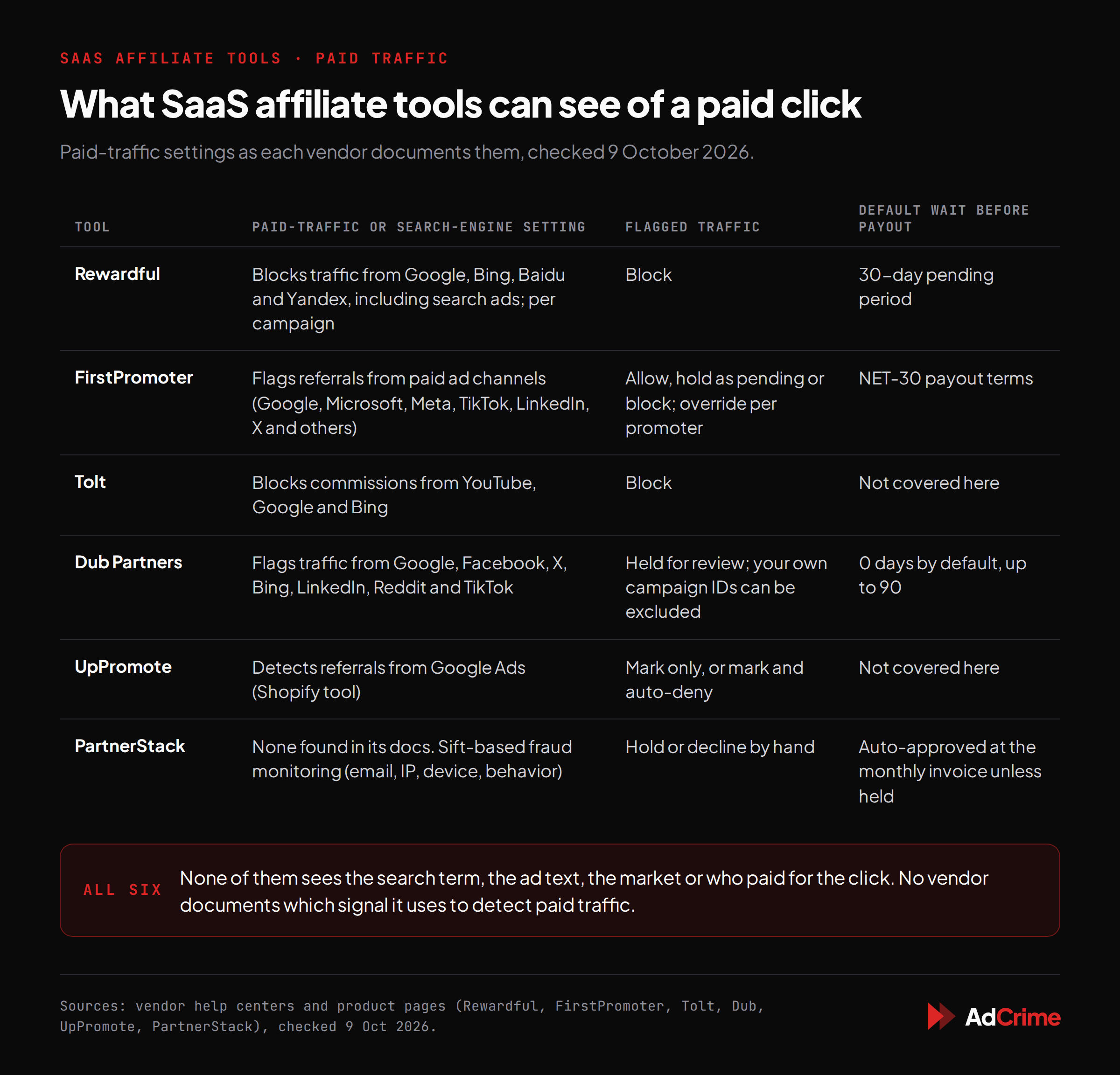
Short answer: they see the visit that reaches your site, not the ad that started it. Rewardful, FirstPromoter, Tolt, Dub and UpPromote now offer settings that block or flag affiliate traffic from Google and other ad platforms. Those settings can only judge what arrives at your site and checkout. When an affiliate's Google ad sends the searcher to the affiliate's own coupon or review page first, and that page passes them on through the affiliate link, the visit usually reaches you looking like a referral from the affiliate's site.
None of these tools sees the ad itself: the search term, the ad text, the country it ran in, or the account that paid for the click. We found no paid-traffic control in PartnerStack's public docs at all. And promotion codes tied to affiliates open a second gap, because a code copied onto a coupon site earns commission without any click.
That doesn't make the settings pointless. They catch the simplest case, and you should turn them on. They are one layer, and the rest of this piece covers the others.
I run AdCrime, and we sell monitoring of the part these tools can't see (paid ads on branded coupon searches in Google), so weigh the argument accordingly. Product details come from each vendor's own help pages as of 9 October 2026; the numbers come from our own scans.
What the tools offer
Many SaaS affiliate programs run on link-and-cookie tools. A partner shares a link such as yourapp.com/?via=example-partner, the tool's script stores a cookie when someone lands, and the sale is matched up later, often through Stripe. Several of these tools now offer a paid-traffic or search-engine block. Here is what each one documents:
- Rewardful launched Traffic Source Control in February 2025. One toggle blocks "traffic from Google, Bing, Baidu, and Yandex. This includes traffic from search ads." It's set per campaign, and you can add your own list of domains to ignore.
- FirstPromoter flags "referrals that originate from paid advertising channels", naming Google, Microsoft, Meta, TikTok, LinkedIn, X and others. Each campaign decides whether those commissions are allowed, held as pending or blocked, and you can override that for a single promoter.
- Tolt can "block commissions from YouTube, Google, and Bing".
- Dub Partners has a paid traffic rule that flags partner traffic from Google, Facebook, X, Bing, LinkedIn, Reddit and TikTok and puts the commissions on hold. You can list your own Google Ads campaign IDs so your own ads aren't flagged.
- UpPromote, a Shopify tool included for comparison, can detect referrals from Google Ads and either mark them or mark and auto-deny them.
- PartnerStack runs fraud monitoring built on Sift, which looks at emails, IP addresses, device fingerprints and behavior. We found no paid-search or traffic-source setting in its docs, which also say programs can't configure their own fraud rules. Its article on brand bidding is advice to brands: "Clear agreements with affiliates are essential to avoid bidding wars that drive up your costs."
None of the vendors documents how it decides that a visit came from an ad: the referrer, Google's click ID, UTM tags or something else. Keeping that private is understandable for a fraud feature. It also means you should test what the setting catches rather than assume.
How a referral looks from your side
When someone clicks a link, their browser usually tells the next site where they came from. That's the referrer. With current browser defaults, a site on a different domain gets only the address of the site the visitor left, such as https://www.google.com/, not the full page. Even a click straight from a Google ad doesn't bring the search term with it.
Now take two versions of the same affiliate ad on "[yourbrand] promo code":
Route 1  Google ad → yourapp.com/?via=example-partner
         Your site hears: came from google.com

Route 2  Google ad → deals.example/yourbrand-promo → yourapp.com/?via=example-partner
         Your site hears: came from deals.example (or nothing)
In route 1, the ad sends the visitor straight to your site with the affiliate's parameter on the link. The visit comes directly from Google, and if the affiliate's Google Ads account uses auto-tagging, Google's click ID (gclid) lands on your URL too. This is the case a search-engine block is best placed to catch. Tapfiliate lists it among the tactics to ban: "Direct-linking from paid search ads to your website via affiliate tracking links."
In route 2, the ad points at the affiliate's own page. The searcher lands there, then clicks "Get code" or gets sent on by a script. Now the referrer is the affiliate's site, or nothing if the page withholds it. Google's click ID, if there is one, sits on the address of the affiliate's page, not yours. The visit that reaches you looks the same as one from a reader who found that page on their own.
That isn't a flaw in any one tool. The tool runs on your site and at your checkout. The ad happened two steps earlier, on someone else's page.
What none of them can see
Even when a tool correctly flags a visit as coming from Google, it is reading the visit, not the ad. None of these tools can tell you:
- The search term. Whether the click came from "[yourbrand] coupon" or a generic category search.
- The ad text. Whether the ad used your name, promised a discount you don't offer, or looked like your own ad.
- The market. Which countries the ad ran in. An ad can show in one country and not another, so what you see depends on where you search from.
- Who paid for the click. The Google Ads account behind the ad, and whether it belongs to the partner who gets the commission or to someone further along the chain.
A referrer of google.com can't even say whether the click was an ad or an ordinary search result.
The second leak: codes
Codes tied to partners are a standard feature. Rewardful says "Customers can be attributed to affiliates via coupon codes right at checkout time", with no visit to your site and no cookie. FirstPromoter gives each partner its own Stripe promotion code and puts the use case plainly: "A creator reads their code out on a podcast. The redemption still attributes."
That's the feature working as designed. The trouble starts when a partner's code leaves the partner. Codes get copied onto coupon sites, or shown on the very page an affiliate's "[yourbrand] promo code" ad points to. Every redemption credits that partner, and there is no click for a traffic rule to look at.
In SaaS, a misattributed signup can keep paying. Rewardful's coupon documentation notes that "the first affiliate to whom a Stripe customer is assigned will receive commissions for any subsequent purchases". If your program pays recurring commission, one intercepted signup pays out every month the customer stays.
What we see in Google
Between 19 February and 25 September 2026, we looked at ads on branded coupon searches for the brands we scan, using public Google results followed down the redirect chain, and picked out the ones whose click led to a SaaS affiliate tool's link. Among the ads we classed as confirmed or likely affiliate interceptions:
- 592 ads across 43 brands, from 42 different sites, led to a PartnerStack link.
- 452 ads across 78 brands, from 39 sites, led to a link with a
via=parameter. That's Rewardful's default, but FirstPromoter and other tools accept it too, so this group isn't Rewardful alone. - 41 ads across 13 brands, from 14 sites, led to a link with
fpr=, the parameter FirstPromoter uses in its own help examples.
In every one of these, the ad came from a third-party site, not the brand's, and the brand's affiliate link turned up further down the redirect chain. That's the shape of route 2, not route 1.
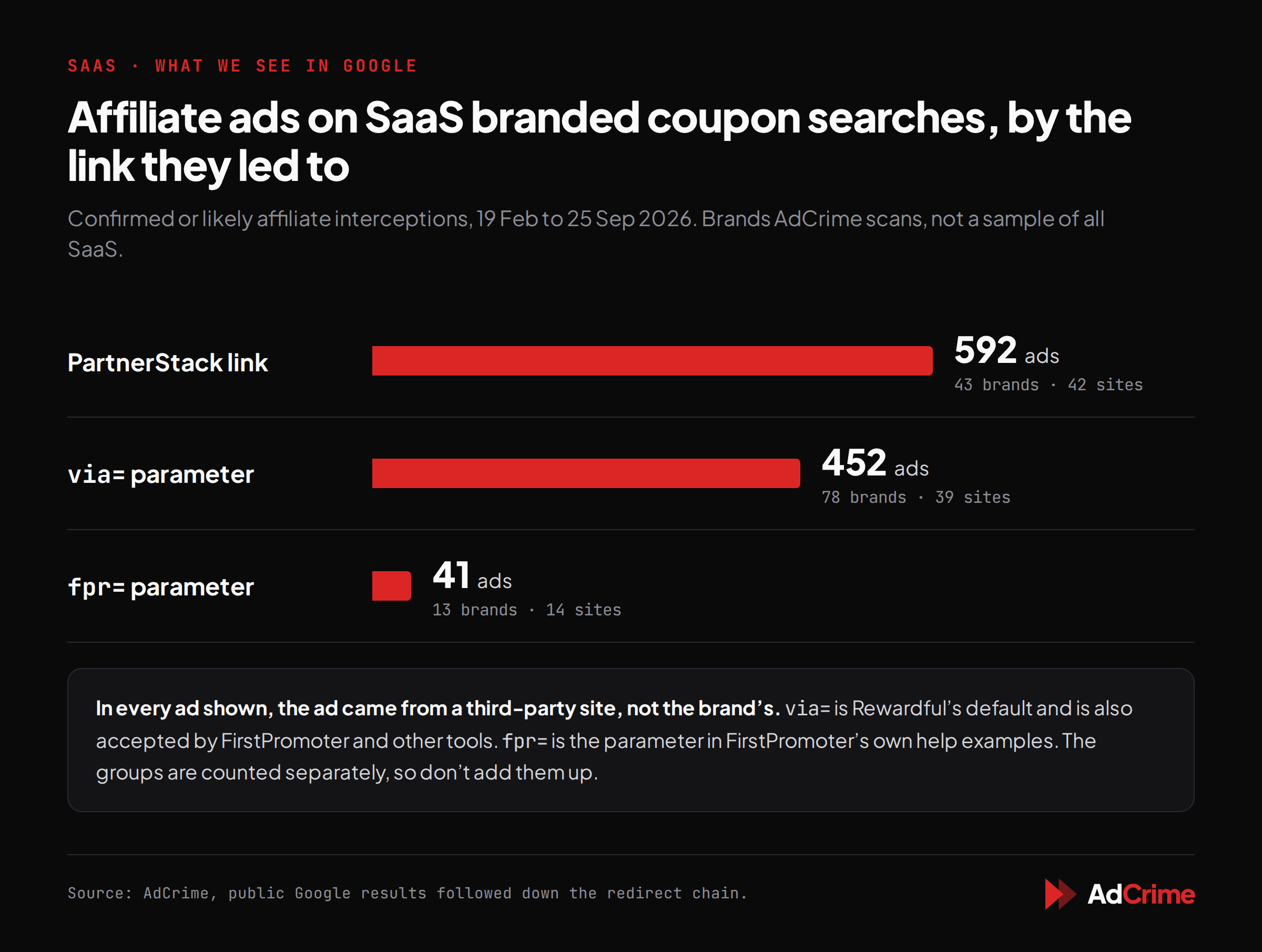
Read these numbers for what they are. They cover brands we chose to scan, not a sample of all SaaS. They count ads, not sales or commissions. We don't know which of these programs had a paid-traffic setting switched on, or how each third-party page handed visitors on. What they do show is that in every ad in these three groups, a third-party site sat between the ad and the brand, which is the case a paid-traffic setting is least likely to catch.
What to do about it
Tapfiliate's blog puts the problem in one line: "Policy without monitoring is a speed bump, not a wall." You need both, plus a payout schedule that leaves you time to use them.
1. Write the rule into your program terms. Ban bidding on your brand, its misspellings and its coupon terms ("coupon", "promo code", "discount") on any search engine, and say the ban covers ads that send people to a page that then links to you. Say who may publish codes, and where. Google's Unfair advantage policy lists "Affiliates that advertise on Google Ads against the applicable affiliate program rules", which only helps if your rules say so. Our policy template has clauses to copy.
2. Set the hold period to cover your refund window. Defaults vary. Rewardful's pending period is "30 days following the sale". FirstPromoter defaults to NET-30 payout terms and suggests matching them to your refund period. Dub's holding period defaults to 0 days, with options up to 90. PartnerStack automatically approves eligible commissions when the monthly invoice is generated unless you hold them, and an approved commission can't be changed. If you offer a 30-day guarantee or a long trial, hold at least that long, plus time to review. More on validation windows.
3. Turn on the paid-traffic setting anyway. It catches route 1, direct-linking from an ad to your affiliate link. Where the tool offers a review option (FirstPromoter's pending, UpPromote's mark only, Dub's hold), start there, so you see what gets flagged before anything is denied automatically. In Dub, add your own Google Ads campaign IDs first.
4. Give each affiliate its own code, and watch where it appears. Shared codes make leaks hard to trace. With one code per partner, search "[yourbrand] promo code" regularly and note which sites publish which code. A code on a site that isn't the partner's is a leak: retire it and issue a new one. Rewardful notes you can also limit codes to new customers.
5. Search your own brand and coupon terms from a few markets. What you see from your office is one country. Check "[yourbrand] coupon", "promo code" and "discount" from the countries where you sell, on desktop and mobile, and note who each ad says it's from. It helps to know the ways affiliates keep ads out of a brand's view before you conclude there's nothing there.
6. Follow the click down the redirect chain. When you find an affiliate ad, follow where it goes: the ad's landing page, then the link to you, then the parameter on it. A ?via=example-partner, a ?fpr=xmpl42 or a PartnerStack link points to a partner in your own dashboard. Save the date, the search, the country, a screenshot and every URL. Here's how to read a redirect chain.
7. Act on the account. Decline or hold the commissions inside the review window, switch that partner's paid traffic to blocked where your tool allows it, and remove the partner if it continues. If the same person runs several partner accounts, act on all of them. Our enforcement workflow sets out the steps in order.
If you want to know who is bidding on your brand's coupon searches in Google, the first scan is free.
Mario Vaher is the founder of AdCrime, which traces paid ads on branded coupon searches (public Google results, followed down the redirect chain) to the network and publisher account behind each one.