
Short answer: the domain in a coupon ad is a storefront, and storefronts are easy to replace. Google's free Ads Transparency Center shows the verified advertiser behind an ad, its legal name and location, and the other sites it advertises. On 16 October 2026, one verified account had run US ads for 67 different coupon and review sites over the previous year, 52 of them in the last 30 days. Remove one of them from your affiliate program and the account behind it still has 66 more.
It's natural to enforce on the domain. You see a coupon site's ad on "[brand] promo code", you trace it to a publisher, you ask the network to act, and the domain comes off your list. The question that step skips is who bought the ad, and what else that account runs.
I run AdCrime, and tracing these ads is what we sell, so weigh the argument on its evidence. Every check in this piece uses Google's own public tools and needs nothing from us.
One account, 67 sites
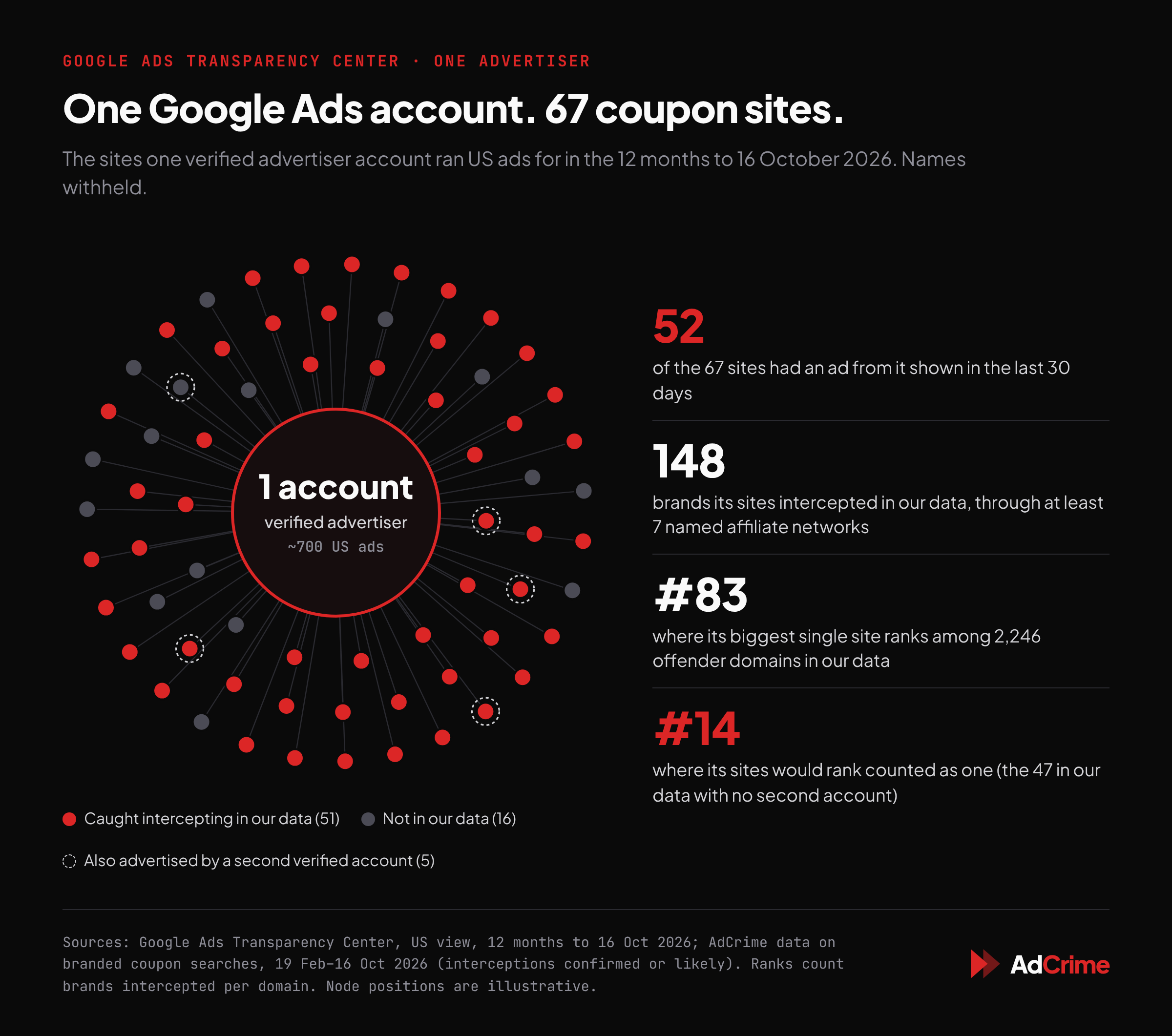
In August we looked up a mid-sized coupon site from our data in the Transparency Center. Its ads came from a verified company account, and a first look showed that account advertising about 20 coupon, blog and review sites. On 16 October we counted properly. In the US view, the account had about 700 ads from the past 12 months, by Google's count, for 67 different sites. Fifty-two of those sites had an ad from it shown in the 30 days to 16 October.
The ads are text ads built from a few templates: "[N]% Off [Brand] Promo Code", "[Brand] Coupon Code" and the like, with a different brand in almost every headline. A few still carried unfilled template text, such as {__PLACEHOLDER__} Exclusive Deal.
Then we checked those 67 sites against our own records. Here, an interception is an ad we traced, confirmed or likely, through the searched brand's own affiliate program.
| In our data, 19 February to 16 October 2026 | |
|---|---|
| Sites we had caught intercepting | 51 of 67 |
| Interceptions from those sites | 559 |
| Brands they intercepted | 148 |
| Markets | 15 |
| Named affiliate networks in their click chains | at least 7 |
Taken one site at a time, the account looks minor. Its biggest site had intercepted 23 brands, which ranks 83rd among the 2,246 offender domains in our data. Counted together, the sites tell a different story. Five of the 67 also carried ads from a second verified account, so we set them aside. Of the other 62, the 47 in our data reached 124 brands, which would rank 14th.
Other accounts in our data are split across storefronts the same way, so the ranking is a comparison, not a league table. We don't name the account or its sites. The point is the shape, and it's one we've described before from the affiliate-network side.
Three IDs behind one coupon ad
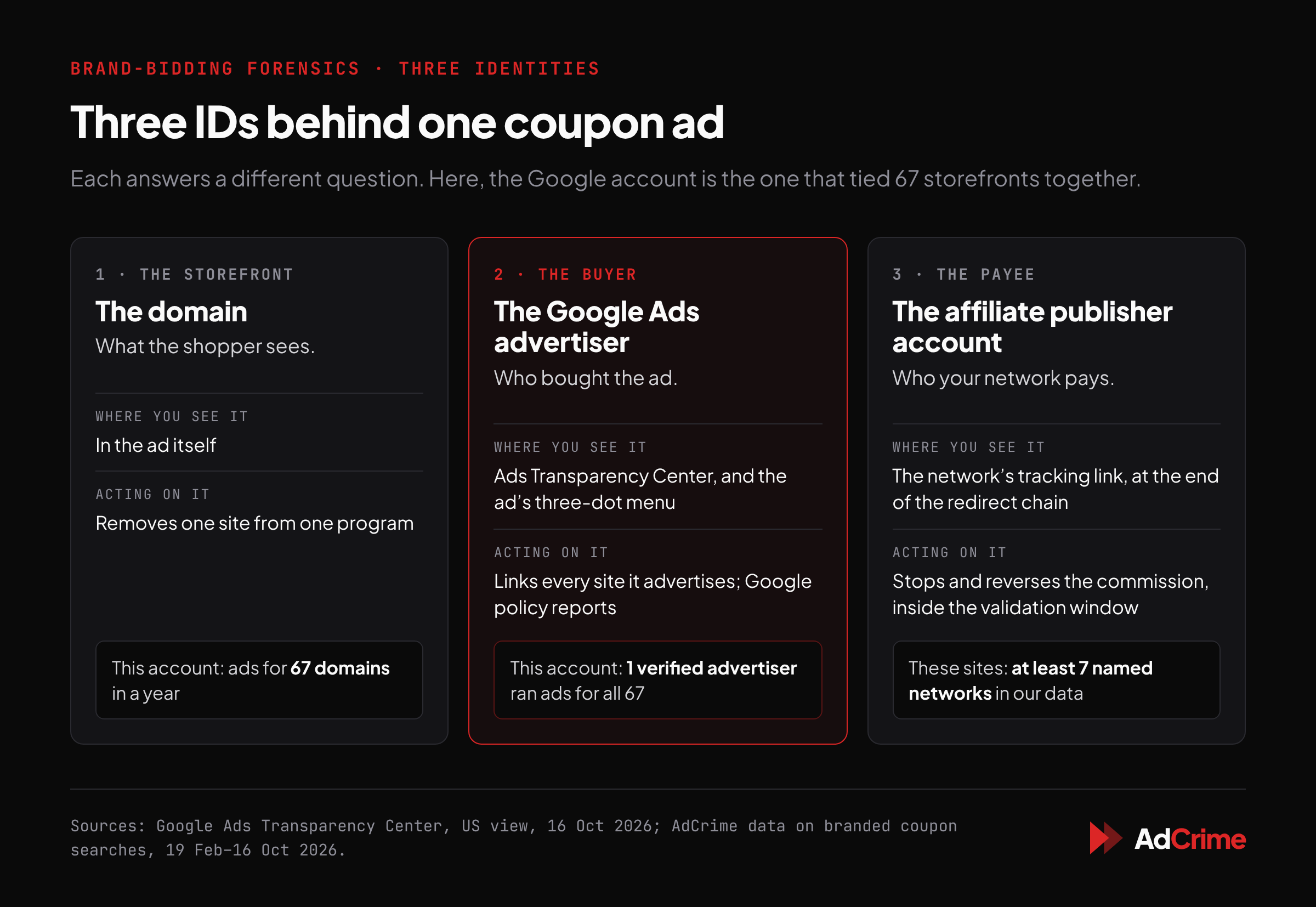
Every affiliate ad on your brand's coupon search has at least three identities, and each answers a different question.
- The domain is what the shopper sees, and the easiest of the three to replace. This account ran ads for 67 in a year.
- The Google Ads advertiser is who bought the ad. Google shows its verified legal name and location in the Transparency Center and, for the ad in front of you, in the ad's three-dot menu. One account ran ads for all 67 sites.
- The affiliate publisher account is who your network pays. You find it by following the click down the redirect chain to the network's tracking link. These sites went through at least seven named networks in our data.
Network enforcement acts on the third, and domain removals on the first. Publisher IDs can link sites too, when sites share one. Here, it was the Google account that tied all 67 together.
What the Transparency Center shows
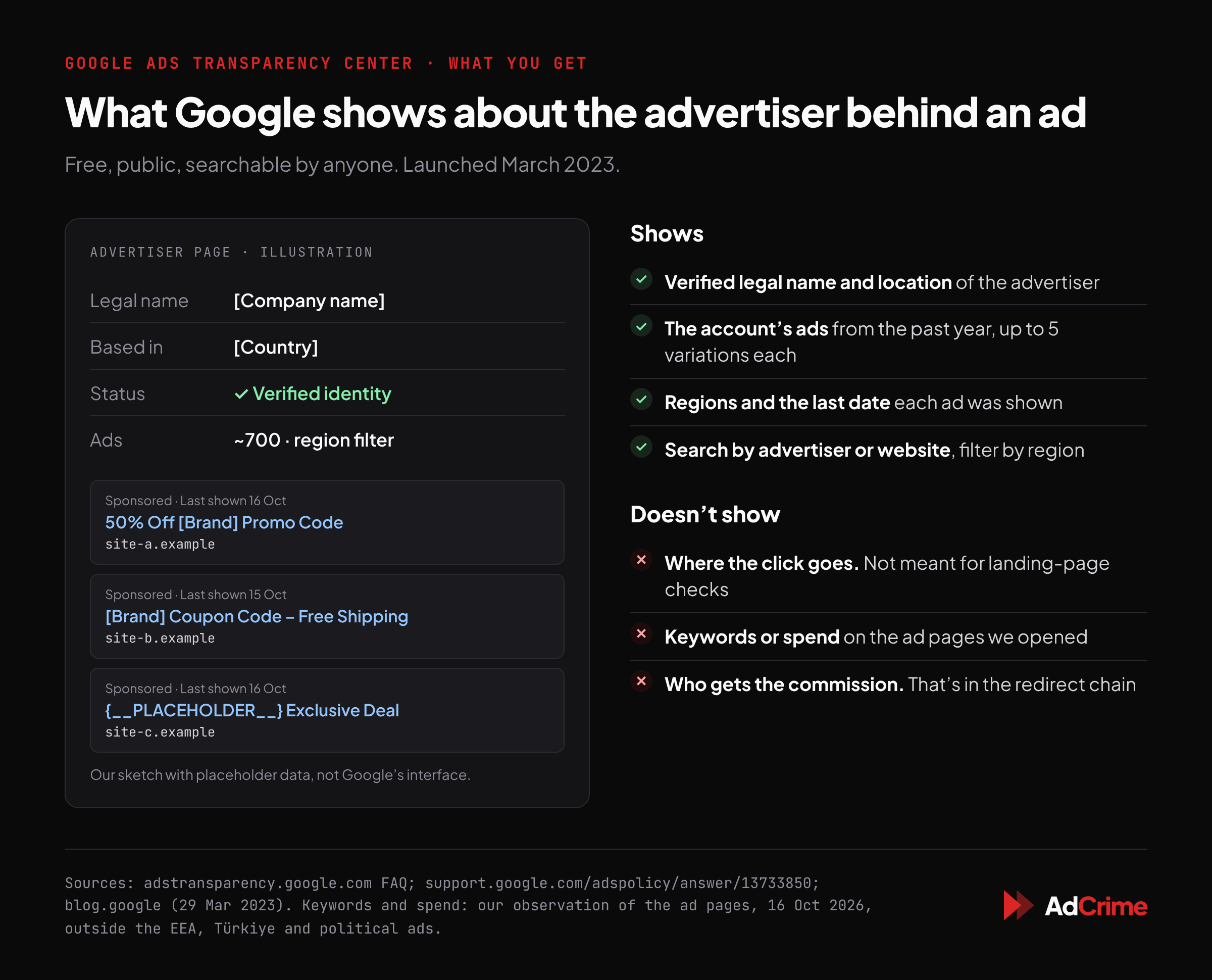
Google launched the Ads Transparency Center in March 2023 as "a searchable hub of all ads served from verified advertisers". Its FAQ and help page set out what you get:
- Who. For verified advertisers, "Google will display the advertiser's legal name, or trademark name and location as provided by the advertiser via the verification program." It also shows "the name of the payer for the ad if that name is different from the advertiser name."
- What and where. The ads themselves, up to five variations of each, the format, the regions they were shown in and the date each was last shown.
- How far back. Ads "for one year from the date the ad was last displayed". New ads can take 48 to 72 hours to appear.
- How to search. By advertiser name or website, filtered by region, date and format.
What it doesn't do matters as much. It is "not intended to be used for landing page verification or click-through validation", so you can't follow an ad from it to see where the click goes. Outside the EEA, Türkiye and political ads, the ad pages we opened showed the ad, the regions and the last date shown, but no keywords, targeting or spend. And it is built around verified advertisers, so an advertiser that hasn't been through verification may not show up in every region.
The same identity is one tap away on the ad itself: "On search ads, you can access advertiser verification information through the 3-dot icon on desktop, or the info icon on mobile."
How to look up the advertiser behind a coupon ad
- Search your coupon terms ("[brand] promo code", "[brand] discount code") in the market you care about. Note the domain each ad shows.
- Search that domain in the Transparency Center, with the region set to the same market. Region matters. Four other coupon sites we checked showed no ads in the US or UK views but did in Germany.
- Open the advertiser. Record the legal name, the location, the verified status and the account ID in the page address.
- Read the account's other ads. Look for other domains, and for headlines that name your brand. Each new domain is a site to check in your program.
- Check those sites on your networks. Search each one in your networks' publisher directories, where they offer one, and follow its ads down the redirect chain to the publisher ID.
- Keep a dated record. Screenshots, account ID, domains, dates. Ads leave the archive a year after they last ran, and ads Google removed for policy violations may not be findable at all.
Four cautions from doing this at scale:
- A domain can have several advertisers. Five of our 67 sites had a second verified account. Check every account a domain search returns.
- A shared name is weaker than a shared account. We found one advertiser name on four different account IDs. Treat the account ID as the strong link.
- Ad counts don't measure brand bidding. Large coupon accounts run thousands of generic ads ("Voucher Codes", "Exclusive Discounts"). Read the headlines.
- A mismatch is worth noting, not concluding. One coupon site we looked up was advertised, across all regions, through dozens of accounts in unrelated names, from a logistics firm to a ski and sports center. We can't tell from outside why. Put it in your report and let Google look.
Same account, same page
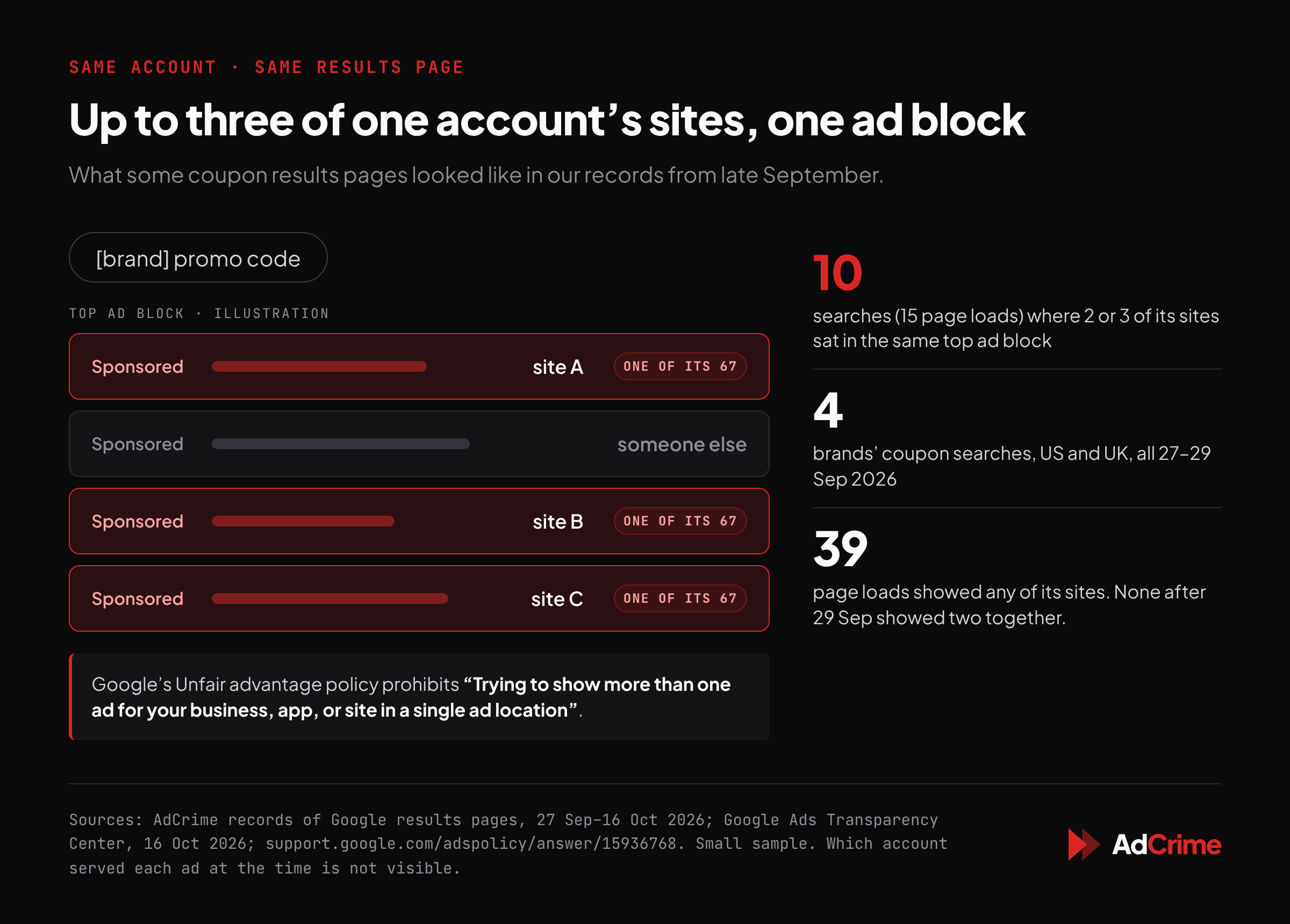
Google's Unfair advantage policy prohibits "Trying to show more than one ad for your business, app, or site in a single ad location".
In our records of the results pages, this account's sites sometimes appeared together. Of 39 page loads between 27 September and 16 October where any of its sites showed up, 15 (from 10 searches) had two or three of them in the same top ad block, on coupon searches for four brands in the US and UK. On 7 of those loads, at least two of the sites were ones with no second verified account in the Transparency Center. All of them fell between 27 and 29 September. None of the later loads showed two together.
It's a small sample, and we can't see which account served each ad at that moment. But it looks like what Google's double-serving form describes, and you can collect the same evidence yourself with dated screenshots.
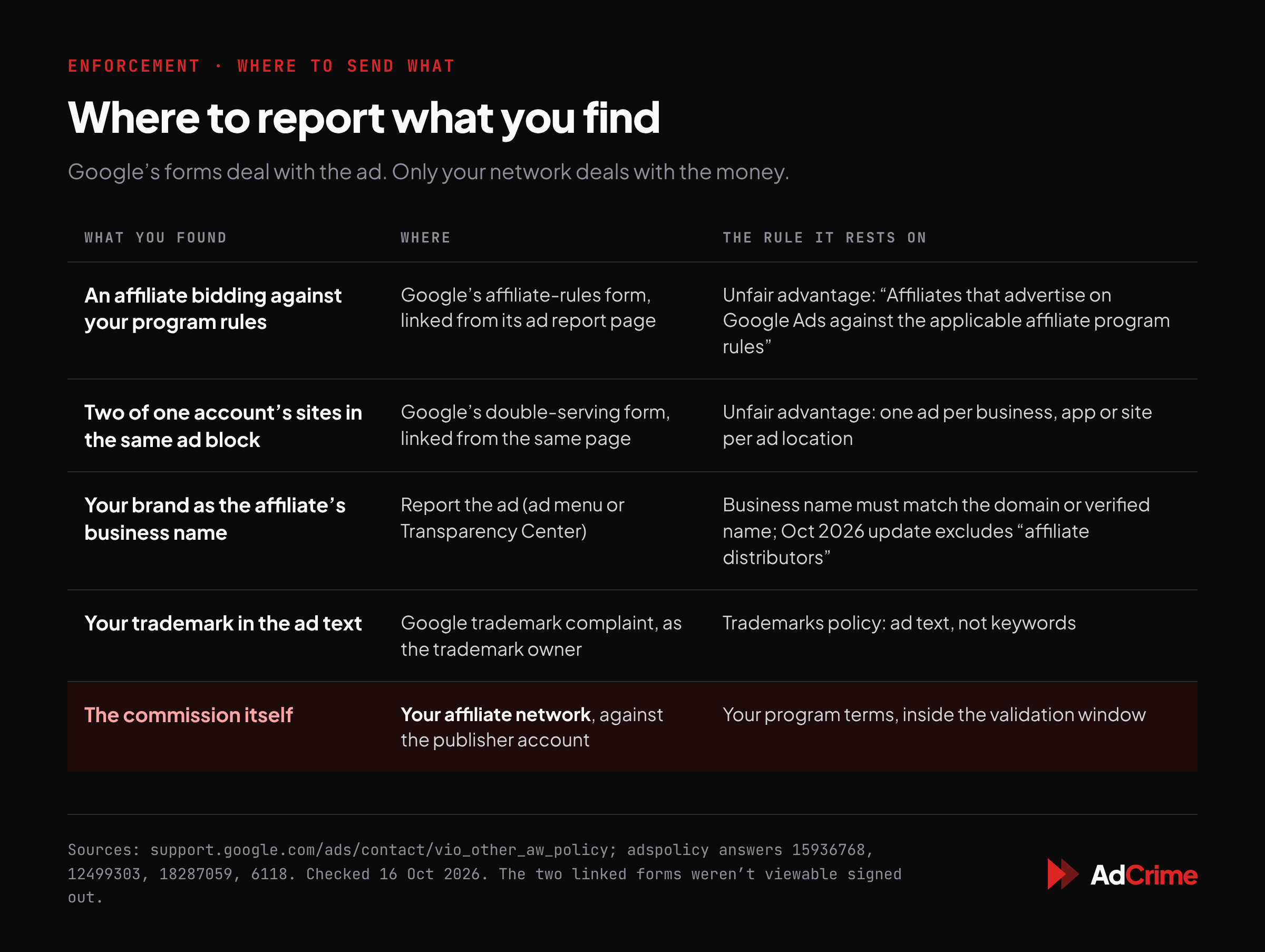
What you can report, and where
Google gives brands several routes:
- Affiliates breaking your program rules. The Unfair advantage policy lists "Affiliates that advertise on Google Ads against the applicable affiliate program rules". Google's ad report page links a separate form: "If an advertiser is using your client's brand and final URL/domain in violation of affiliate program rules, you can report them here."
- One account, several ads on one page. The same page links a second form "For multiple ads that are showing for one company ("gaining an unfair advantage policy")".
- Your brand as their business name. Google's business information rules say "Your business name must exactly match either the domain name or legal name verified via the Advertiser verification program." Its October 2026 update adds that "Third-party resellers, independent booking intermediaries, affiliate distributors, and secondary sellers do not qualify for this provision and are prohibited from using the standalone brand name of the goods, services, or properties they offer as their business name."
- Verification. Google may ask for verification from advertisers "advertising on brand-related queries". It asks resellers and affiliate marketers going through verification to provide details of "the business delivering goods & services to the end customer", and says that false information means "you won't be verified or will lose your verified status, and your account will be suspended."
- Trademark in the ad text. Google's trademark policy "will not restrict: Using trademarks as keywords", and accepts complaints only "against specific advertisers identified on the basis of their URL(s)". Useful for ad text, not for the bidding itself; our guide to Google trademark complaints covers the limits.
None of these replaces your network. The commission is paid to the publisher account, so that's where you file and claw back. What the Google identity adds is the list of storefronts behind one account, so the network can look at all of them, and so your terms can cover every site and account the same party runs, as we argued in the piece on network terminations.
What this can't tell you
- Who gets paid. The Transparency Center shows who bought the ad, not who your network pays. Linking the two still takes the redirect chain.
- Who controls the sites. A verified account running ads for a site doesn't prove it owns the site, and accounts can be shared. That's why we set aside the five sites with a second account.
- Everything. We read the account's US ads. It showed more ads in other regions, so 67 is a floor. Some sites run ads only in some countries, and unverified advertisers may not appear.
- Rates. Our brands are self-selected, the same-page records are a few days in late September, and the ranking compares one account's sites against other accounts' storefronts.
Without buying anything
- Take the domains you've removed from your program this year and look each one up in the Transparency Center.
- For each advertiser account, list every other domain it advertises, in each market you sell in.
- Search those domains in your networks' publisher directories, and follow their ads down the redirect chain.
- Screenshot any results page where two of the same account's sites appear together, with the date and search.
- Report through the Google forms above, and send the account ID and domain list to your network contact with your next filing.
- Write your terms for the operator, not the site, and ask publishers to declare every domain they run.
If you'd rather start from your own data, the first scan is free.
Mario Vaher is the founder of AdCrime, which traces paid ads on branded coupon searches (public Google results, followed down the redirect chain) to the network and publisher account behind each one.